“We need AV for a 250-person conference. Please send a quote.”
It sounds like a reasonable enquiry. From a production standpoint, though, it leaves most of the important questions unanswered.
Are those 250 people seated theatre-style or around tables? Is there one keynote speaker or a six-person panel? Will delegates ask questions? Does the presentation contain detailed spreadsheets or mostly large images? Is somebody joining remotely? Can the AV team access the room the evening before, or do they have two hours in the morning?
Each answer can change the equipment, crew, setup time and therefore the quote.
A useful AV brief does not need to specify every microphone, loudspeaker or screen. It needs to explain the event clearly enough for the AV company to make those technical decisions with fewer assumptions.
Here is what to include.
What is an AV brief?
An AV brief is the information an audiovisual company uses to understand the event, design the technical setup and prepare its quote.
It can be a formal document, an email, a spreadsheet or information submitted through an enquiry form. What matters is whether it gives the supplier enough context to understand what is happening in the room.
For a straightforward meeting, the brief may only take a few paragraphs.
For a multi-room conference, hybrid AGM or awards show, it may include floor plans, a detailed running order, speaker information, venue documentation and content requirements.
The objective is not to prove that you understand AV terminology. It is to make the event easier to understand.
Practitioner insight: brief the outcome before the equipment
One of the easiest mistakes is sending an equipment shopping list too early.
For example:
- 4 microphones
- 2 screens
- 1 PA system
- Stage lighting
That tells the supplier what you think you need, but not what the system has to achieve.
Compare it with:
250 delegates were seated theatre-style. One keynote speaker, followed by a moderator and a five-person panel. Audience Q&A after the panel. Presentations include PowerPoint, embedded video and several detailed charts. All seats need a clear view of the slides.
The second version gives an experienced AV team enough information to question, refine and design the specification.
What should you include in an AV brief?
A useful AV brief should cover the event purpose, venue, timings, audience, room format, programme, speakers, content and any requirements for recording, streaming or technical support.
The following checklist gives an AV supplier the strongest starting point.
| Brief item | What to provide | Why does it affect the quote |
| Event overview | Event type and objective | Helps define the level and style of production |
| Date and timings | Event hours, access, rehearsal and de-rig | Determines equipment and crew time |
| Venue | Venue, room and contact | Reveals infrastructure and logistical constraints |
| Audience | Expected attendance and layout | Influences coverage, sightlines and room design |
| Running order | Sessions, panels, videos, Q&A and breaks | Shows how the technical system will actually be used |
| Speakers | Presenters, panellists, host and remote contributors | Influences microphone and monitoring requirements |
| Content | Slides, videos, music, demonstrations and playback | Affects display, audio and switching requirements |
| Online audience | Streaming, recording or remote presenters | Adds broadcast and connectivity requirements |
| Existing AV | Venue equipment or incumbent systems | Helps prevent duplication or compatibility issues |
| Budget | Working range where available | Helps the supplier recommend an appropriate solution |
1. Explain what the event is trying to achieve
Start with the event itself, not the kit.
Tell the AV company whether you are organising a conference, leadership meeting, AGM, product launch, awards dinner or another type of corporate event.
Then explain what needs to happen.
For example:
Annual sales conference for 300 employees. The main objective is to present the new commercial strategy, run two panel sessions and finish with audience questions.
That short description tells the supplier far more than “conference AV required”.
Event format matters because a keynote, panel discussion, product reveal and awards presentation create different production demands even when the audience size is identical.
2. Give the exact date and event timings
The AV company needs both the live-event schedule and the time available to build and remove the system.
Include:
- Event date
- Delegate arrival or doors-open time
- Programme start and finish
- Rehearsal time
- AV access or get-in time
- Venue clear time
- De-rig or get-out window
A conference starting at 09:00 does not necessarily mean the crew can arrive at 07:00 and make everything work.
A large screen, stage, lighting system, multiple wireless microphones and presentation control may require considerably more build and testing time.
The AV company therefore needs to work backwards from when the room must be ready, not simply from when the first presentation starts.
3. Share the venue and room details
The venue often changes the technical recommendation as much as the audience size does.
Send to the supplier:
- Venue name
- Exact room or event space
- Venue contact
- Room dimensions where available
- Ceiling height where relevant
- Seating layout
- Floor plan
- Loading information
- Access hours
- Known rigging or power restrictions
- Details of existing in-house AV
HSE guidance on venue and site design recommends understanding the event, audience, access and infrastructure when assessing a venue or site.
Those considerations are equally useful when an external AV team is planning its work.
Why this matters more in London
London venues can vary dramatically.
A purpose-built conference space may have straightforward loading and technical infrastructure. A hotel ballroom, historic building, private members’ club or corporate office may have different access routes, goods lifts, ceiling restrictions or delivery procedures.
Do not assume the supplier can “sort access on the day”.
Confirm the venue’s loading arrangements early and pass them on.
Do you need to send a floor plan to an AV company?
Yes, if one is available. A floor plan can answer technical questions that guest numbers cannot.
It helps the supplier assess:
- Stage position
- Screen positions
- Audience sightlines
- Speaker coverage
- Front-of-house technical desk location
- Camera positions
- Cable routes
- Breakout-room requirements
- Available working space
FOH, or front of house, is the technical control position from which operators may manage sound, video and lighting during the event.
If you do not have a floor plan, ask the venue for its latest event-space drawing rather than sketching dimensions from memory.
For more complex conference requirements, a supplier providing conference AV hire may also develop a scaled technical layout during the design process.
4. Describe the audience and room layout
Audience numbers are useful, but they should never be the only basis for specifying AV.
Tell the supplier:
- Expected attendance
- Minimum and maximum numbers, if not final
- Seating format
- Whether people are seated or standing
- Whether there are tables
- Whether there are breakout rooms
- Whether delegates move between spaces
- Any known accessibility requirements
A 200-person theatre-style conference may have very different sightlines from a 200-person cabaret layout.
The content matters too.
Detailed financial tables need to remain legible at the back of the room. Large photographs and simple keynote slides place less pressure on screen size at the same viewing distance.
5. Send the running order, even if it is still a draft
A draft running order is one of the most useful documents you can give an AV supplier.
A running order, sometimes called a run of show, sets out what happens and when.
For example:
| Time | Session | Technical requirement |
| 09:00 | Welcome | Walk-on music, host microphone, title slide |
| 09:10 | CEO keynote | Presentation, lapel microphone, confidence monitor |
| 09:45 | Video | Full-screen playback with audio |
| 10:00 | Panel | Moderator plus five panellists |
| 10:35 | Audience Q&A | Roving microphones |
| 11:00 | Break | Holding slide and background music |
Now the AV team can see the event as a sequence rather than a static equipment list.
They can understand how microphones change hands, when videos need to run, what must appear on screen and where transitions need technical cues.
Do not wait until the running order is final. Send the current version and label it clearly with a date or version number.
6. Explain who will be speaking
Speaker information affects microphones, stage layout, monitoring and show flow.
Provide the expected number of:
- Keynote speakers
- Hosts or MCs
- Panellists
- Moderators
- Audience Q&A contributors
- Performers where relevant
- Remote speakers
You do not necessarily have to decide whether every presenter needs a lapel, handheld or headset microphone yourself.
Describe what the people will be doing.
For example:
The host moves around the stage. The keynote presents from centre stage. Six panellists remain seated. Audience questions will come from the floor.
That gives the audio team much better information for microphone planning.
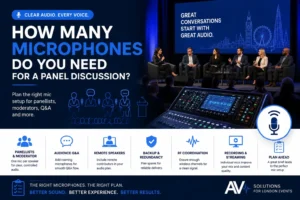
Realistic example: the six-person panel
Imagine a conference with a moderator and six panellists.
Writing “six microphones” into the brief may already be wrong. There are seven people on stage before you even consider audience Q&A, a spare microphone or a remote guest.
The running order also determines whether everybody needs a microphone simultaneously or whether equipment changes between sessions.
This is why describing the programme is usually more useful than choosing the microphone count yourself.
7. Explain what will appear on the screens
An AV supplier needs to understand the content, not just whether you want “a screen”.
Tell them whether you will use:
- PowerPoint or Keynote
- Videos
- Detailed charts or spreadsheets
- Live demonstrations
- Multiple laptops
- Sponsor slides
- Camera feeds
- Remote presenters
- Countdown timers
- Presenter notes
- Holding graphics
Content affects the appropriate display size, aspect ratio, playback system and video switching.
If presenters need to see their slides without turning towards the main audience screen, confidence monitors may also be appropriate.
Audio Visual Hire London’s AV equipment hire range includes presentation playback, video switching, confidence monitors, cameras, projection and LED systems, showing how several different technical elements can sit behind what the organiser simply experiences as “the presentation screen”.
8. State whether the event is being recorded, streamed or joined remotely
Hybrid and recording requirements should be included in the first brief, as they can significantly affect the technical architecture.
Mention:
- Remote presenters
- Remote audience
- Streaming platform
- Recording requirements
- Camera coverage
- Online Q&A
- Captions
- Presentation feeds
- Any private viewing requirements
A room designed only for an in-person audience is not automatically ready for broadcast.
The sound mix that works through the room PA, for example, may not be the same mix needed for viewers online.
If remote participation is part of the programme, this should be scoped as part of the event’s hybrid streaming requirements rather than added shortly before doors open.
9. Tell the supplier what the venue already provides
Clarify which AV equipment, infrastructure and services already exist at the venue before asking an external supplier to price the event.
Useful questions for the venue include:
- Is any AV included?
- Is the use of in-house equipment mandatory?
- Can external AV suppliers work onsite?
- What power is available?
- What rigging options are approved?
- What internet connection is available?
- Are there supplier access procedures?
- Are there sound restrictions?
- When can production teams load in?
- When must the room be cleared?
Do not assume an external system and venue equipment will automatically integrate.
The supplier needs to know what they are connecting to before the event.
10. Include your budget if you have one
A realistic budget range helps the AV company design an appropriate solution rather than guessing how ambitious the specification should be.
It does not mean the supplier should simply spend the whole amount.
It provides commercial context.
For example, there may be several technically workable display approaches. Knowing the available budget lets the supplier explain the trade-offs and recommend where spending is most useful.
If the budget has not been confirmed, say so.
Also provide:
- Quote deadline
- Procurement requirements
- Purchase-order process
- Required supplier documentation
- Any approval milestones
These details are especially useful for corporate procurement and agency work.
What affects the accuracy of an AV quote?
An AV quote becomes more accurate as assumptions are replaced by confirmed event information.
The largest scope changes often come from:
- Venue and access
- Equipment specification
- Crew requirements
- Build and de-rig hours
- Rehearsal time
- Number of event spaces
- Streaming or recording
- Rigging or staging requirements
- Programme complexity
- Late-night or overnight working
HSE’s guidance on managing an event specifically highlights coordination during build-up, load-in, breakdown and load-out, not only while the public is present.
That is an important commercial point too. Crew and technical resources are required while the event is being built and removed, not just during the hours delegates are in the room.
Power requirements can also affect planning. HSE’s event electrical-safety guidance identifies layout, power requirements and access to mains supplies as considerations when planning temporary electrical installations.
An organiser does not need to design the electrical system. They do need to provide the technical team with accurate venue information so competent people can plan accordingly.
Common mistake: briefing AV from the guest count alone
Guest count is a starting point, not a technical specification.
Two 300-person events can require very different systems.
Event A is a single keynote with simple presentation slides.
Event B includes live video, five panellists, audience questions, remote presenters, multiple cameras and an online audience.
The headcount is identical.
The production scope is not.
Instead of sending:
300 guests. Need sound and screens.
Send:
300 guests, theatre-style. One keynote, two panel sessions, audience Q&A and one remote presenter. Presentations contain video and detailed charts. The event will also be recorded.
That one paragraph can remove several major assumptions from the quote.
Common mistake: waiting for every detail before contacting the AV supplier
Your brief does not need to be final before you start the conversation.
A good supplier should be able to distinguish between:
- Confirmed information
- Working assumptions
- Decisions still required
If the venue is confirmed but the speaker list is not, send what you know.
If the running order is still changing, send the latest draft.
If you are deciding between a projector and an LED, describe the room and content rather than making the choice prematurely.
For more complex productions, involving the technical team early can also help align scenic design, lighting, sound, screens, crew, and venue logistics throughout the full event production process.
A simple AV brief template you can copy
Use this as a starting point when requesting a quote.
Event overview
Event name:
Event type:
Purpose/objective:
Expected audience:
Venue
Venue:
Room:
Venue contact:
Floor plan attached: Yes / No
Date and timings
Event date:
AV access from:
Rehearsal:
Doors open:
Programme starts:
Programme finishes:
De-rig complete by:
Programme
Keynote speakers:
Panel sessions:
Audience Q&A:
Awards/performances:
Breakout rooms:
Remote speakers:
Content
Presentation slides:
Video playback:
Music/audio playback:
Live demonstrations:
Camera feeds:
Broadcast
Live streaming: Yes / No
Recording: Yes / No
Remote audience: Yes / No
Captions: Yes / No / To discuss
Venue information
Existing AV:
Loading/access restrictions:
Power information:
Internet information:
Rigging restrictions:
Other venue requirements:
Commercial information
Working budget:
Quote required by:
Purchase-order requirements:
Other approvals:
Attach the floor plan and latest running order where possible.
What should you send first if you do not have a full brief?
If time is short, send the venue, room, date, audience size, event format and current running order first.
Those details let the supplier start asking useful questions.
A floor plan should be followed as soon as you can obtain one.
You can then refine the number of speakers, content, streaming, stage design, and other requirements during the technical discussion.
The fastest route to an accurate quote is rarely a longer equipment wish list. It is usually better to have information about the room and what has to happen inside it.
FAQs
What information does an AV company need for a quote?
An AV company normally needs the event date, venue, room, audience size, timings, programme format and information about speakers, presentations, playback, streaming and recording. Access hours and a floor plan are also valuable because they affect setup, crew and technical design. More complex events may require a site visit or further technical discussion before the final specification is confirmed.
Do I need a floor plan when requesting an AV quote?
A floor plan is strongly recommended if available. It helps the AV supplier evaluate stage position, display sightlines, technical desk location, loudspeaker coverage, camera positions, and cable routes. For simple meetings, it may not be essential at first enquiry, but for conferences and more complex productions, it can significantly reduce assumptions.
Should I send my running order to the AV company?
Yes. Send the latest version even if it is still a draft. The running order shows how many speakers, panels, videos, Q&A sessions and transitions the technical team must support. Label the document with a date or version number so everybody knows which programme is current.
Should I tell an AV company which equipment I want?
You can mention equipment preferences and describe the event requirements. If you want an LED wall, for example, explain the room, audience, content, and the reason for preferring an LED wall. This allows the supplier to confirm whether the proposed equipment is technically and commercially appropriate rather than simply pricing a shopping list.
Can an AV company quote before the venue is confirmed?
A supplier may be able to provide an initial scope or budget estimate, but the venue can materially affect the final design. Room dimensions, sightlines, access, power, rigging, internet and setup times can all change equipment and crew requirements. Confirm the venue before treating the AV specification as final.
What makes an AV quote more accurate?
Accurate venue information, a realistic running order, confirmed audience numbers, clear speaker requirements and known setup times make the biggest difference. Recording, streaming, staging, rehearsal and access requirements should also be stated early. The aim is to reduce assumptions before equipment and labour are priced.
Conclusion
A strong AV brief does not need to read like a technical specification.
It needs to tell the supplier what the event is, where it happens, who is involved, what the audience needs to see and hear, how the programme runs and how much time is available to build it.
Start with the event outcome. Add the venue, floor plan, running order, speaker details and content. Then let the technical team turn that information into the appropriate sound, video, lighting and crew specification.
If your event details are still developing, that is fine. Mark what is confirmed and what is still to be decided.
Planning an event in London? You can send Audio Visual Hire London your event details, including the room, date, audience and current programme, to discuss the technical requirements and obtain an itemised quote.